
How to Make Your Body Happy When Working from Home


Working from home can be particularly taxing on your body. When you spend hours in front of a screen at a desk, your body can feel rather fatigued and sore.
Your eyes feel strained…muscles ache…your head feels just heavy to hold up.
Ouch!
“It feels just impossible to find a comfortable position when you’re sitting for hours on end!”
A 42-year-old patient came to the clinic. He recently started working from home. He had lots of trouble sleeping. His back was sore and he just didn’t feel productive during his workday.
But could all those symptoms be related?
YES
Consider…
- How is your work station set up when working from home?
- How often you are taking breaks?
- Are you maintaining your physical health and activity when working from home?
“I just don’t know how people do it, I feel that I am always on, always working, I never have a break”
To continue in this remote virtual working world, we have to find ways to still take care of our physical health and activity.
Understandably, when working from home you need to sit at a desk, on a computer for long periods of time. But that DOES NOT mean that:
- You should be in pain, or
- You should sit and not move all day
Ok… I will probably continue working from home…I don’t want to be uncomfortable… But what can I do?
When you sit all day on couches, dining room chairs, and any other make-shift workspace you often put undue stress on your bodies. You may be curled up…hunched over… sitting in creative positions…not the most ideal posture.
It is no wonder your eyes feel strained, neck aches, and back gets sore.
You may feel so sore and uncomfortable that it is hard to focus.
With these 3 strategies, you can keep your body happy when working from home!
- Consider WHERE you are working
- STRETCH and reposition at your workstation.
- Get up, get out, stay active, just MOVE!
Consider WHERE You Are Working From Home
How can you set up a body-friendly work station when working from home?
Expectedly, when working from home, you can come up with some strange locations to work from.
I for one, am a culprit of working from my couch…not the most ergonomic spot.
It is fair that working from your couch or bed is far more relaxing than working from your desk at your office in your stiff work clothes, but be careful!
When you work from relaxed, often hunched, creative positions you neglect your posture. This can lead to back and neck pain, which could be avoided with a proper body-friendly workstation.
How can you make the most ergonomic workspace when working from home?
- Eyes just above the level of your computer screen
- Computer screen directly in front of you…arm’s length away
- Elbows bent to 90 degrees with your hands resting flat on your table, desk, or keyboard
- Thighs parallel to the floor
- Feet flat on the floor with your ankles bent to 90 degrees (elevate your feet if needed)
By sitting this way, you can improve your sitting posture and alleviate stress on your back, neck, hips, etc.

There’s another reason for getting out of your bed to work from home. You can get better sleep if you avoid working from your bed!
“Keeping computers…and work materials out of the [bed]room will strengthen the mental association between your bedroom and sleep”.
Division of Sleep Medicine at Harvard Medical School
I get it… it is rather tempting to stay in your pyjamas and find the most laidback spot when working from home. BUT consider that working at a table or desk in a proper postural position may actually have its benefits.
That doesn’t mean you need to wear a suit every day though!
STRETCH and reposition in your workstation…How?
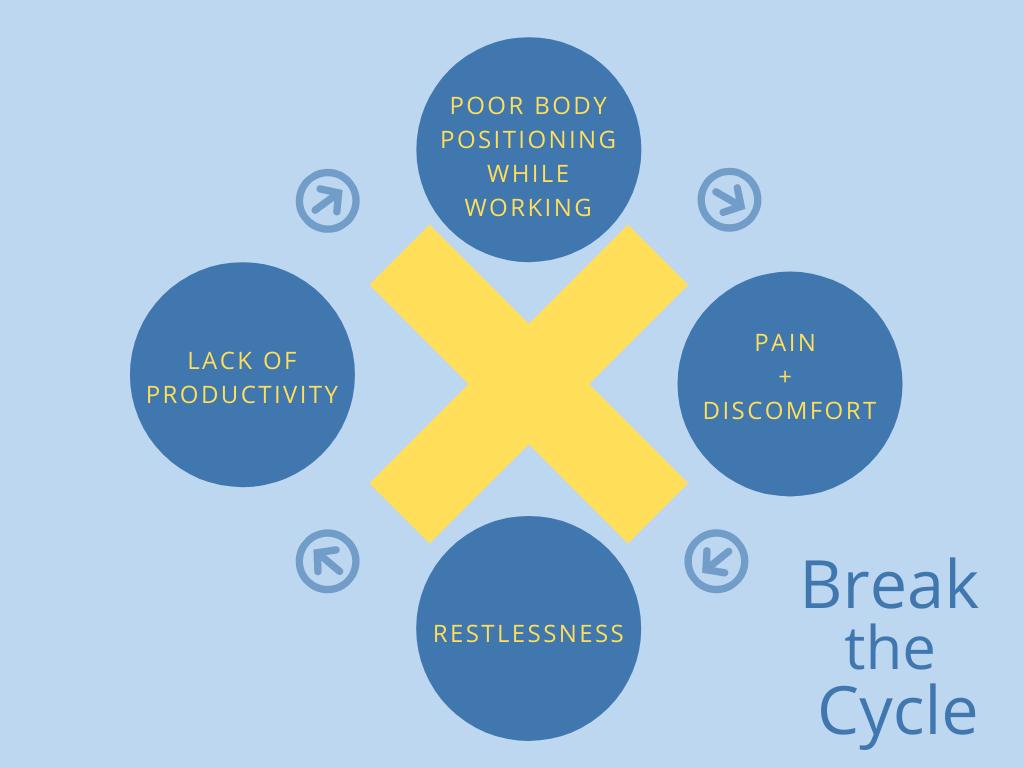
It is no wonder you begin to feel restless and uncomfortable when you sit in the same position, looking at a screen, all day.
You need to work, but when you just can’t find a good position, you simply cannot be at your utmost productivity…
But what can you do?
You can’t just go for a walking break every 10 minutes. Alternatively, when getting up isn’t an option, you can use these 5 workstation stretches when you feel sore and fatigued when working from home.
- Neck stretch
- Chest stretch
- Side stretch
- Back stretch
- Standing stretch
Follow the arrows in the photos below to know where you should feel the stretch.
Neck Stretches
- Sitting upright, bring your right ear to your right shoulder… repeat left
- Be careful not to bring your shoulder to your ear
- Hold for 15 seconds
- Repeat to the other side

- In your ear to shoulder position, tilt your chin slightly up to look up at the ceiling
- You should feel this stretch in the front of the side of the neck
- Hold for 15 seconds
- Repeat to the other side

- In your ear to shoulder position, tilt your chin down and pretend to sniff your underarm (or do… up to you)
- You should feel this stretch in the back of the side of the neck
- Hold for 15 seconds
- Repeat to the other side

Chest Stretch
- Place your hands on the back of your head with your elbows out to the sides
- Push your elbows back
- Squeeze your shoulder blades together like you are trying to hold a pencil on your upper back
- Hold for 15 seconds

Side Stretch
- Sitting upright, interlace your fingers and lift your arms straight over your head
- Without moving your buttocks off the chair, lean your torso and arms to the right
- Hold for 15 seconds
- Repeat left

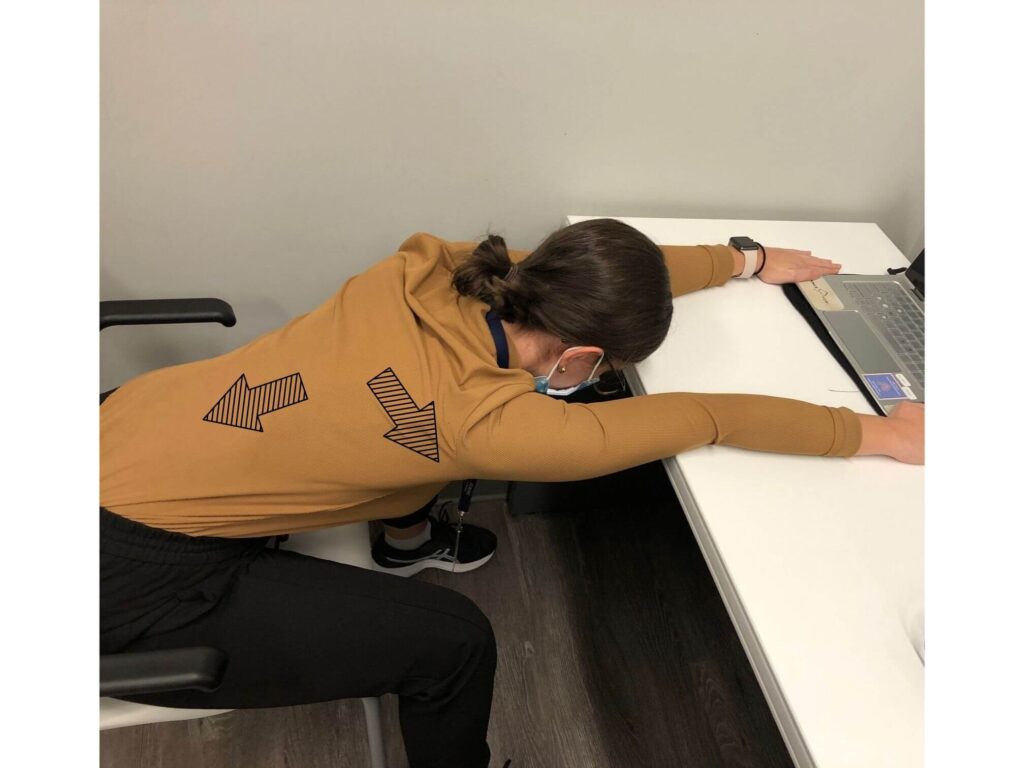
Back & Shoulder Stretch
- Place your hands flat on the desk
- Keeping your back flat, slide your chair back until you feel a slight stretch in your shoulders and back
- Hold for 15 seconds
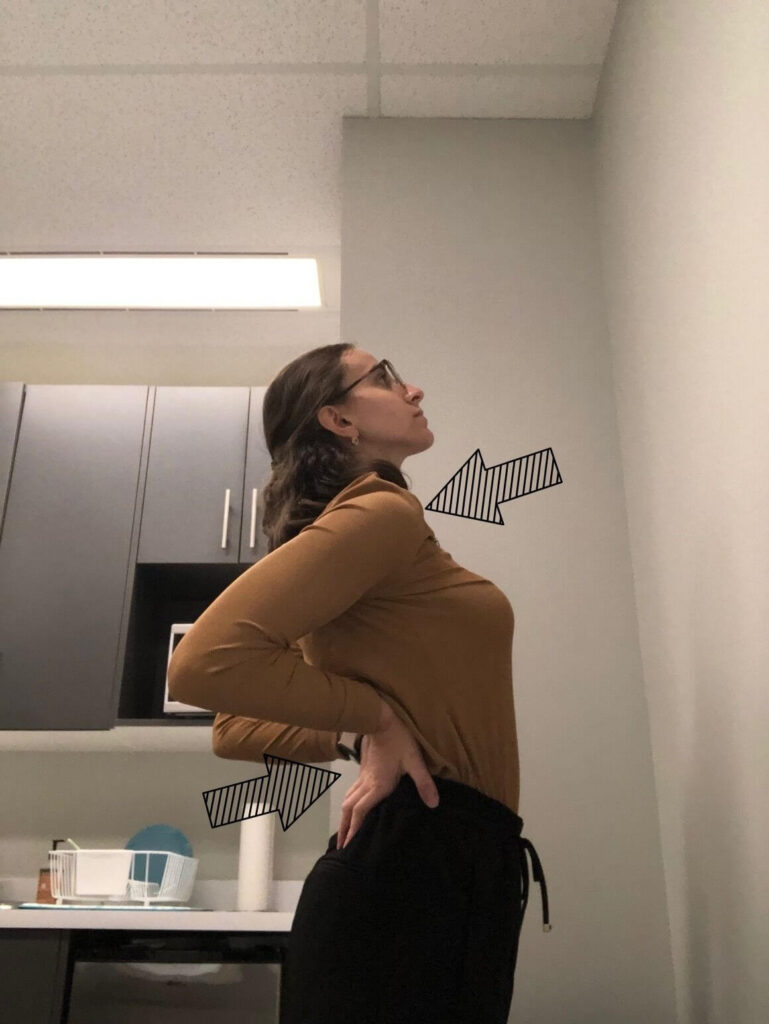
Standing Stretch
- Stand up from your chair
- Place your hands on your back with your thumbs facing forward and elbows out and back
- Take a deep breath in as you push your hands into your lower back and lean back
- Relax the stretch and breathe out
- Hold for 1 slow breath and repeat 5x
Do these stretches whenever you feel achy or restless throughout your workday.
Get up, get out, stay active, just MOVE!
These tips will help prevent and ease aches, eye strain, and stress when working at a desk for hours and hours.
Understandably, you are busy, have tight deadlines, and have a million things that you need to do. Nevertheless, you must prioritize your health and wellbeing, even when working from home.
When working from home you can forget the commute to and from work, which is a great time saver! But often, the commute allows you to be even remotely active before and after work.
Think about it!
Yes, biking or walking to work are clear examples of active transportation, but other forms of commuting can be active as well.
For example, if you take public transit to and from work, you need to walk to the station. Whether that’s from your car, another form of transit, or from wherever else you were before. On public transit, there’s also often no sitting room…you need to stand…and then walk to work!
You may have a long day of Zoom meetings, report writing, what have you. Being already at home, it’s fair that you want to sit down on the couch with some chips and chill out.
You know that physical activity and movement are important. Finding time and getting into a routine of exercise and physical activity can be rather difficult if it doesn’t just happen naturally.
Tips on how you can stay physically active when working from home.
- Develop a routine: Set aside at least half an hour every day to go for a walk, a run, a bike ride, or anything else that gets you up, out, and moving. Not only will you be up and moving but getting some fresh air will really help you regroup and recharge.
- Complete short strength training bouts: You don’t necessarily need to go to the gym or set aside hours to lift weights. Merely taking a number of 5-minute breaks throughout the day can be enough. Just do a few sets of strength training exercises and over the day you to get a full body workout.
- Get up for food: We all get snacky. Don’t keep a repertoire of treats near your workstation, but rather keep them tucked away in the kitchen so you are forced to get up, get moving, and even get a much needed and much deserved nutritious snack.
- Take your conference calls while walking: During a conference call, you have time to stand, pace, or walk outside. You can be active even while engaging in important business matters. Just be sure you have access to your computer if needed!
- Hold yourself accountable: Staying active is so difficult when we are not leaving the house. Hold yourself accountable for your actions. Be proud and celebrate your achievements, but acknowledge when you are falling through the cracks and make the necessary changes.

Working from home success story
The patient discussed before, later came back to the clinic. He implemented these strategies and started allocating more time for activities that he enjoyed.
“Sitting all day for work is hard, but I started blocking off more time to spend with my family…. I get an hour for lunch. I only need half an hour to eat so I go on walks for the rest of the hour”.
He shares that work is still hard, but working from home should not be more stressful, physically or mentally, than working from the office.
Even when working from home, you still need to find time to take care of your physical health. If you are constantly achy and restless, you won’t be very productive.
Learning to prioritize your physical health during the workday is so important if you want to continue to do all of the things I love.
Stay active and move as much as possible so that you can stay healthy even when cooped up at home.
Can you modify your working-from-home habits to make your body happy?
All of these tips may seem rather overwhelming, so you need to find what works for you. Remember, just because you are working from home, does not mean that we should be lounging all day! Focus on:
- Where you work and how you sit when you work
- Stretching and repositioning to relieve soreness, stiffness, and restlessness
- Taking active breaks from sitting
Think to yourself…
What are you currently doing to make your body happy when you are working from home?
What can you do to help make your body happy and prioritize your physical health?
If you are already working at an ergonomically friendly workstation then that’s great! Keep it up! But if you are currently working from the comfort of your bed, you may want to consider changing things up and moving to a desk.
Your eyes don’t need to hurt, your neck doesn’t need to strain, and your back doesn’t need ache. You can set your body up for success even when you’re sitting for hours on end!
References
- Deng, Zechuan, René Morissette, and Derek Messacar. “Running the Economy Remotely: Potential for Working from Home during and after COVID-19,” May 28, 2020. https://www150.statcan.gc.ca/n1/pub/45-28-0001/2020001/article/00026-eng.htm.
- “Twelve Simple Tips to Improve Your Sleep.” Twelve Simple Tips to Improve Your Sleep | Healthy Sleep. WGBH Educational Foundation, December 18, 2007. http://healthysleep.med.harvard.edu/healthy/getting/overcoming/tips.
- “Council Post: 10 Ways To Stay Active While Working From Home.” Forbes. Forbes Magazine, May 28, 2019. https://www.forbes.com/sites/forbescoachescouncil/2019/05/28/10-ways-to-stay-active-while-working-from-home/.
- Robert H. Shmerling, MD. “The Truth behind Standing Desks.” Harvard Health Blog. Harvard Health Publishing, June 18, 2020. https://www.health.harvard.edu/blog/the-truth-behind-standing-desks-2016092310264.
- “Stretching – At the Workstation.” Canadian Centre for Occupational Health and Safety, n.d. https://safety.queensu.ca/sites/webpublish.queensu.ca.ehswww/files/files/General%20Safety/Workstation%20Stretches.pdf.
FAQ
Should I invest in a standing desk?
Jumping right to a standing desk from a seated desk for your full workday can cause pain if your body is not ready to stand for hours at a time. Standing desks can also be rather expensive. If you are interested, try elevating your computer to standing eye-level. Set a timer for a certain amount of time (say half an hour) to stand, followed by a sit break. You can continuously increase the amount of standing that you can handle and progress to a standing desk.
How often should I reposition or stand when working from home?
The Canadian Centre for Occupational Health and Safety recommends that we take a break every 5-10 minutes for every hour you spend your workstations. They recommend taking a moment with your eyes off the screen, that we reposition every few minutes, and take frequent standing breaks. That being said, do what feels right. If you feel fidgety, restless, or uncomfortable… take a few moments to yourself to either try some of the tips above. Your body will thank you if you listen to it.
How can I physically separate work and leisure time when working from home?
With these 2 strategies, you can better separate work and leisure when working from home.
1. Avoid working in areas that you feel most relaxed to create a boundary between places meant for rest and relaxation and the contrary, workplace productivity and pressure.
2. Give yourself time to do activities that you enjoy, away from the workstation. If you specify hours to start and end your workday you can keep a good physical separation. Keep a similar routine as you would when working from an office outside of the home.